
Download waveware® UX – CAFM, Maintenance, Medical Technology, Digital Process Management
Overview
waveware® UX is a web client designed to streamline the management of digital processes across specialized industries, including CAFM (Computer-Aided Facility Management), maintenance operations, and medical technology. The application focuses on delivering a user-centric experience by integrating customizable interfaces and intuitive navigation. Its primary purpose is to simplify complex workflows, enabling professionals to access critical data and complete essential tasks efficiently. By centralizing information through a modular dashboard, waveware® UX helps reduce operational delays and enhances decision-making in time-sensitive environments.
The target users include facility managers, maintenance technicians, healthcare operations staff, and IT administrators who rely on real-time data and structured processes. The app’s design emphasizes clarity and efficiency, minimizing cognitive load while maximizing usability. Although the developer did not provide additional background on the company or its history, the focus on accessibility and responsive design suggests a commitment to inclusive and scalable solutions. Real-world use cases include monitoring equipment status in hospitals, tracking service requests in office buildings, and managing preventive maintenance schedules across multiple sites.
Within the digital workflow ecosystem, waveware® UX fills a niche by combining process guidance with personalized interface control. It supports enterprise-level operations where consistency, compliance, and adaptability are essential. The platform’s ability to adapt to diverse roles and responsibilities makes it a valuable tool in organizations seeking to digitize and standardize their operational processes.
Key Features & Functionality
- Intuitive Operating Concept: The interface is designed around user tasks, avoiding clutter and prioritizing essential functions. This reduces the need for extensive training and allows new users to become productive quickly.
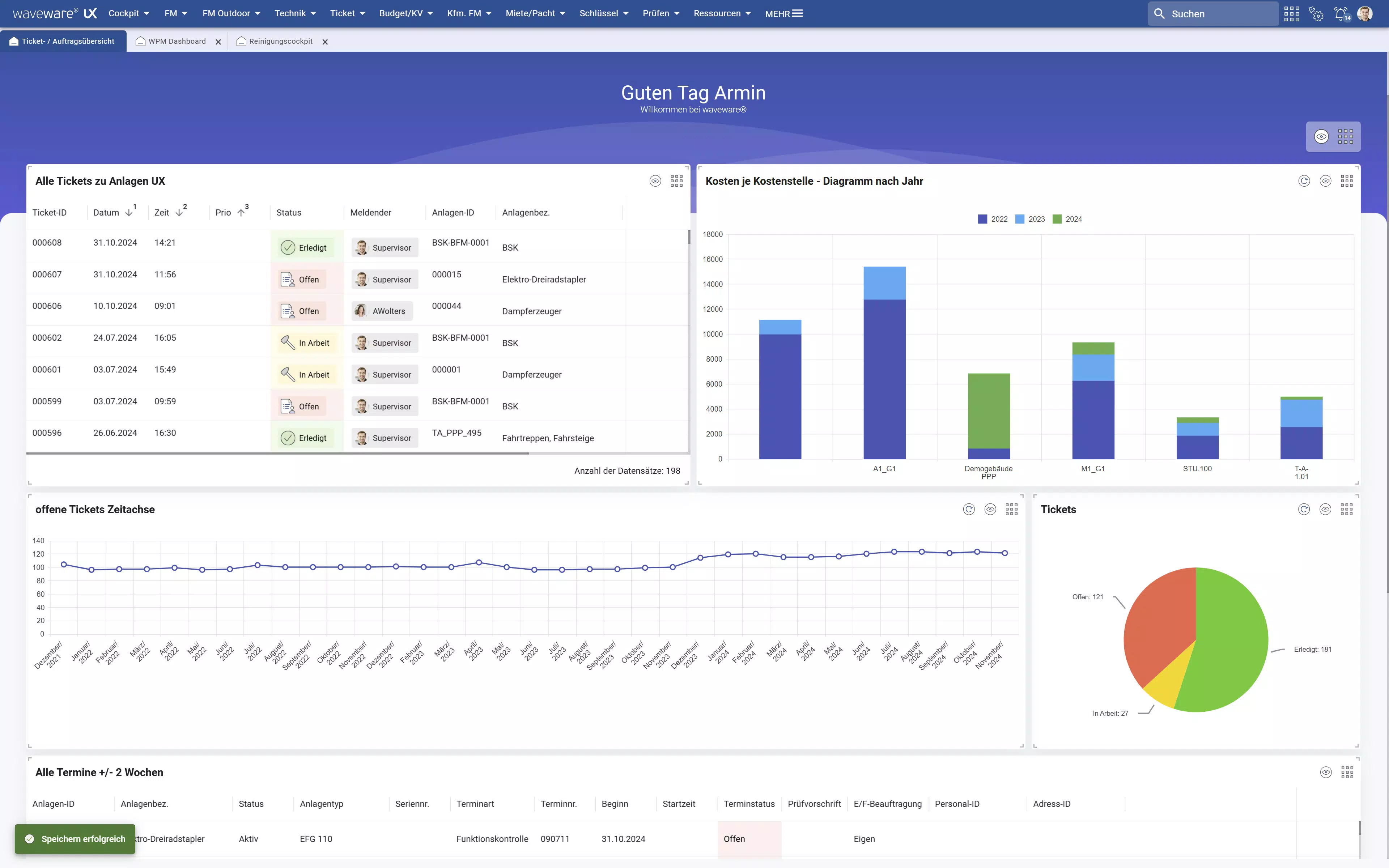
- Customizable Cockpit: Users can build a personalized dashboard using a flexible widget system. Each widget can display real-time data, task lists, or process statuses, enabling role-specific views.
- Responsive Design: The layout automatically adjusts to fit different screen sizes, from desktop monitors to mobile devices. This ensures consistent access to critical information regardless of location or device.
- Accessibility Compliance: The application meets BITV 2.0 and WCAG 2.1 AA standards, supporting screen readers, keyboard navigation, and high-contrast modes for users with visual or motor impairments.
- Guided Process Navigation: Context-aware widgets help users follow workflows step-by-step, reducing errors and ensuring adherence to procedures, especially in regulated environments like healthcare.
For example, a maintenance technician can configure their cockpit to show upcoming service tasks, equipment alerts, and repair history—all in one view. A facility manager might prioritize occupancy reports, energy usage, and work order completion rates. These real-time, role-specific insights improve responsiveness and reduce downtime.
Interface, UX & Performance
The user interface of waveware® UX is clean and modern, emphasizing clarity and functionality. Navigation is structured around a central dashboard where users can access widgets, settings, and process workflows. The visual design uses a consistent color scheme and typography, promoting readability and reducing eye strain during prolonged use.
Interaction flows are logical and predictable. Users can add, remove, and rearrange widgets with minimal steps, supporting rapid personalization. The application responds to user inputs promptly, with no noticeable lag during navigation or data loading. Although the developer did not list formal performance metrics, the responsive layout suggests optimized rendering across devices.
Stability appears to be a priority, particularly given the focus on accessibility and process integrity. The application maintains consistent behavior across different screen sizes and orientations. While specific details about battery usage, memory consumption, or background performance were not disclosed, the overall experience reflects a well-structured, reliable platform suitable for professional environments.
Platform Compatibility & Technical Requirements
waveware® UX is a web-based client, meaning it operates through modern web browsers rather than being installed as a native app. It is compatible with both Android and iOS platforms when accessed via their respective browsers. The application does not require a dedicated app installation, which simplifies deployment and updates.
Specific OS versions or minimum system requirements were not listed by the developer. However, the responsive design implies compatibility with current versions of Chrome, Safari, and other mainstream browsers. The file size is not applicable in the traditional sense, as the app loads dynamically from the web server. Users are advised to ensure a stable internet connection for optimal performance.
Pros and Cons
Pros
- Intuitive interface reduces learning curve for new users.
- Highly customizable dashboard enhances role-specific efficiency.
- Responsive design ensures usability across devices.
- Meets accessibility standards for inclusive use.
- Guided workflows support compliance and reduce errors.
Cons
- Web-based access requires stable internet connectivity.
- Customization may require initial setup time for first-time users.
- Performance depends on browser and network quality.
- Developer did not provide detailed technical specifications.
- Not available as a standalone native app for offline use.
FAQ
Is waveware® UX available for download on Android and iOS?
Yes, waveware® UX can be accessed via web browsers on both Android and iOS devices. While it is not a standalone app, it is optimized for mobile web use.
Can I use waveware® UX offline?
As a web client, waveware® UX requires an active internet connection. Offline functionality is not currently supported.
Is the app secure?
The application is designed with enterprise-grade security in mind. It supports secure authentication and data encryption, though specific protocols were not disclosed.
How often is waveware® UX updated?
Updates are released as needed to improve functionality, fix bugs, and enhance compatibility. The release date was November 27, 2024.
Does waveware® UX support screen readers?
Yes, the application complies with WCAG 2.1 AA standards, including support for screen readers and other assistive technologies.
Final Thoughts
waveware® UX stands out as a powerful, user-focused tool for managing digital workflows in complex operational environments. Its customizable interface, accessibility compliance, and responsive design make it ideal for professionals in CAFM, maintenance, and medical technology sectors. The ability to tailor the dashboard to individual roles ensures that users see only what matters most, boosting productivity and reducing errors.
While it operates as a web client rather than a native app, its cross-device compatibility and secure, guided navigation provide a seamless experience. Organizations seeking to digitize and standardize their processes will find value in its structured yet flexible approach.
Download waveware® UX now


